

Prima di iniziare
Square Cloud è una piattaforma a pagamento: è richiesto un piano attivo per effettuare il deploy, così il tuo progetto gira su un’infrastruttura di livello produzione fin dal primo giorno. Crea il tuo account, poi scegli il piano più adatto a te (scopri cosa include ogni piano).Registrati
Se non hai mai usato Square prima d’ora, registrati per iniziare.
Accedi
Se hai già un account, accedi per iniziare.
Crea il progetto
Crea una cartella con questi tre file.1
Scrivi l'app
index.js risponde a ogni richiesta con un breve messaggio. Legge porta e host dalle variabili d’ambiente PORT e HOST, che Square Cloud imposta a 80 e 0.0.0.0:index.js
2
Elenca le dipendenze
Ogni progetto Node.js ha bisogno di un
package.json: Square Cloud installa i pacchetti che elenca prima di avviare la tua app. Questo esempio non ne ha, ma il file deve esistere e non può essere vuoto.package.json
3
Aggiungi il file di configurazione
squarecloud.app indica a Square Cloud quale file eseguire, quanta memoria riservare e quale versione del runtime usare. SUBDOMAIN pubblica l’app come sito su https://<subdomain>.squareweb.app, quindi scegli un nome che nessuno abbia già preso.squarecloud.app
Comprimi il progetto
Effettui il deploy con la CLI? Salta questa sezione:squarecloud upload comprime la cartella per te.
1
Seleziona i file, non la cartella
Apri la cartella del progetto e seleziona tutto il suo contenuto.
squarecloud.app deve trovarsi al primo livello dello zip: se comprimi la cartella stessa, i file finiscono dentro una sottocartella e il deploy fallisce con MISSING_CONFIG.2
Crea lo zip
- Windows
- macOS
- Linux
Fai clic destro sui file selezionati e scegli Comprimi in file ZIP (Windows 11) oppure Invia a → Cartella compressa.
3
Controlla la dimensione
Lo zip può arrivare fino a 100 MB. Escludi
node_modules, gli ambienti virtuali e le cache di build: le dipendenze vengono installate sul server, e quelle cartelle vengono comunque eliminate durante il deploy.Effettua il deploy
Carica lo zip nella dashboard, oppure effettua il deploy con un solo comando dalla CLI.Tramite dashboard
1
Accedi alla pagina di upload
Accedi alla pagina di upload e carica il file zip del tuo progetto.
2
Configura il tuo ambiente
Dopo aver caricato il tuo zip, dovrai configurare il nome, il file principale o il runtime environment e altre impostazioni per il tuo progetto.
Se stai caricando un progetto web, assicurati di selezionare “Web Publication” e di impostare un sottodominio per il tuo progetto.
Se stai caricando un progetto web, assicurati di selezionare “Web Publication” e di impostare un sottodominio per il tuo progetto.
3
Esegui il deploy del tuo progetto
Infine, clicca sul pulsante “Deploy” per ospitare il tuo progetto su Square Cloud.
Dopo il deploy, puoi monitorare lo stato e i log del tuo progetto dalla dashboard.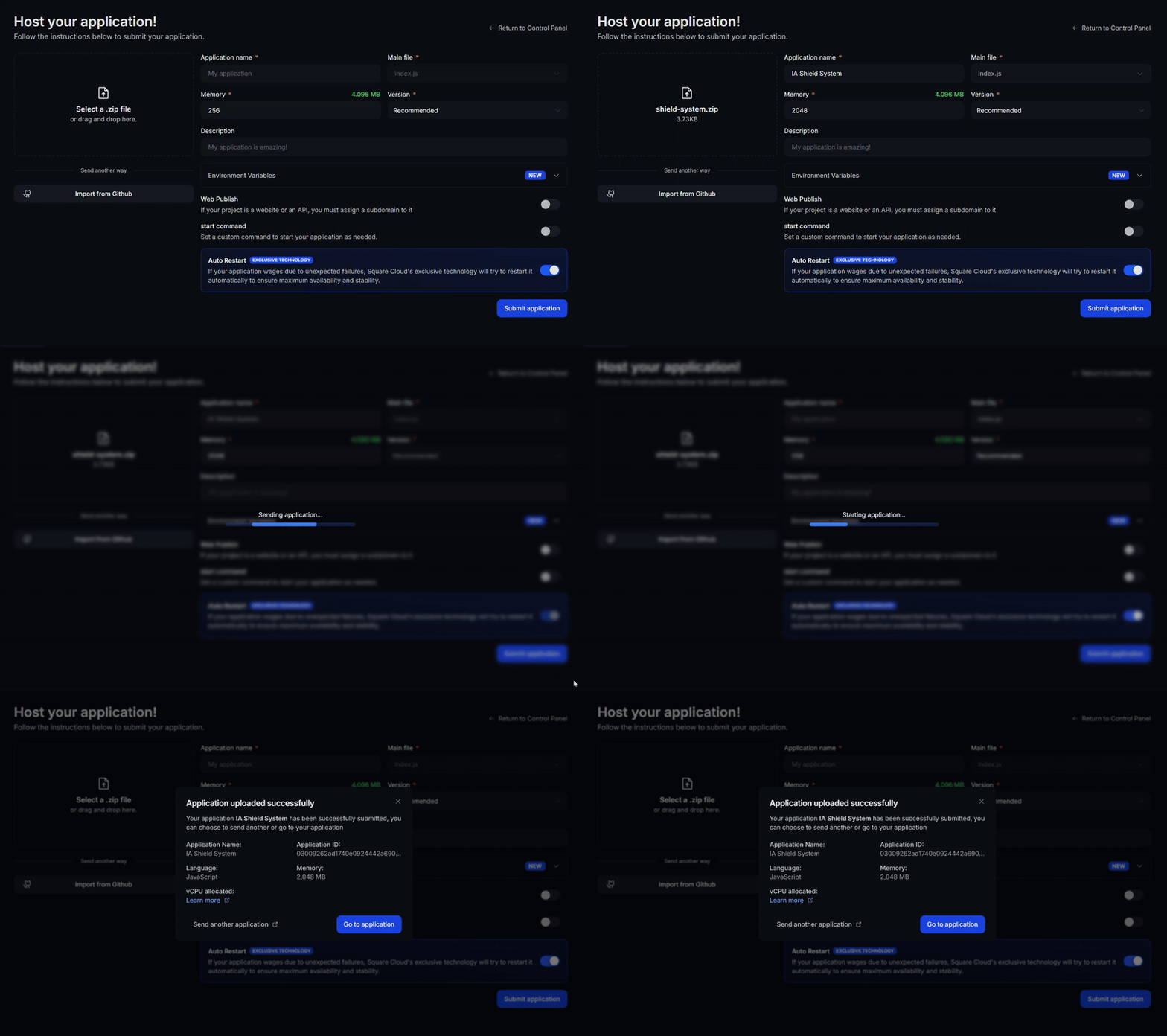
Dopo il deploy, puoi monitorare lo stato e i log del tuo progetto dalla dashboard.
4
Conferma che la tua app sia online
Il primo deploy richiede di solito meno di un minuto. Nella dashboard, attendi che lo stato della tua applicazione mostri “in esecuzione” e controlla i log per eventuali errori di avvio.
Se hai fatto il deploy di un sito web o di un’API, apri
Se hai fatto il deploy di un sito web o di un’API, apri
https://<tuo-sottodominio>.squareweb.app nel tuo browser: dovresti vedere la tua applicazione rispondere. Se hai fatto il deploy di un bot, invia un comando per confermare che sia online.
Tramite CLI
Per utilizzare questo metodo, il tuo progetto deve avere un file di configurazione chiamatosquarecloud.app nella sua radice. Indica a Square Cloud come eseguire la tua applicazione.
Guida al file di configurazione
Scopri come creare il file di configurazione
squarecloud.app che definisce l’ambiente della tua applicazione.1
Installa la CLI
Installa la CLI di Square Cloud. Se ce l’hai già, esegui lo stesso comando per aggiornarla:
2
Accedi
Esegui il comando qui sotto. Apre il tuo browser: approva l’accesso lì e la CLI è pronta. Non c’è nessuna chiave API da copiare. Per script e CI, consulta Autenticazione della CLI.
3
Carica il tuo progetto
Dalla cartella del tuo progetto, esegui il comando qui sotto. La CLI comprime la cartella corrente, escludendo ciò che elenca Per caricare uno zip che hai creato tu, passalo con
squarecloud.ignore, e la carica:--file:4
Conferma che la tua app sia online
Il primo deploy richiede di solito meno di un minuto. Controlla lo stato e i log della tua applicazione direttamente dal terminale:Se hai fatto il deploy di un sito web o di un’API, apri
https://<tuo-sottodominio>.squareweb.app nel tuo browser: dovresti vedere la tua applicazione rispondere. Se hai fatto il deploy di un bot, invia un comando per confermare che sia online.
https://hello-square-yourname.squareweb.app (con il tuo sottodominio) risponde Hello from Square Cloud!.
Prossimi passi
File di configurazione
Ogni campo di
squarecloud.app: memoria, comando di avvio, sottodominio e riavvii automatici.Variabili d'ambiente
Conserva token e stringhe di connessione fuori dal codice.
Risoluzione dei problemi
Risolvi errori di upload, siti che non si caricano e app che non si avviano.
Estensione VS Code
Carica, esegui il commit e segui i log senza uscire dal tuo editor.