

Antes de empezar
Square Cloud es una plataforma de pago: se requiere un plan activo para desplegar, así tu proyecto corre sobre infraestructura de nivel producción desde el primer día. Crea tu cuenta, luego selecciona el plan que mejor se adapte a ti (consulta qué incluye cada plan).Registrarse
Si nunca has usado Square antes, regístrate para comenzar.
Iniciar sesión
Si ya tienes una cuenta, inicia sesión para comenzar.
Crea el proyecto
Crea una carpeta con estos tres archivos.1
Escribe la app
index.js responde a cada solicitud con un mensaje corto. Lee el puerto y el host de las variables de entorno PORT y HOST, que Square Cloud define como 80 y 0.0.0.0:index.js
2
Lista las dependencias
Todo proyecto de Node.js necesita un
package.json: Square Cloud instala los paquetes que lista antes de iniciar tu app. Este ejemplo no tiene ninguno, pero el archivo debe existir y no puede estar vacío.package.json
3
Agrega el archivo de configuración
squarecloud.app le indica a Square Cloud qué archivo ejecutar, cuánta memoria reservar y qué versión del runtime usar. SUBDOMAIN publica la app como un sitio web en https://<subdomain>.squareweb.app, así que elige un nombre que nadie haya tomado todavía.squarecloud.app
Comprime el proyecto
¿Vas a hacer deploy con la CLI? Sáltate esta sección:squarecloud upload comprime la carpeta por ti.
1
Selecciona los archivos, no la carpeta
Abre la carpeta del proyecto y selecciona todo lo que contiene.
squarecloud.app debe quedar en el nivel superior del zip: si comprimes la carpeta en sí, los archivos terminan dentro de una subcarpeta y el deploy falla con MISSING_CONFIG.2
Crea el zip
- Windows
- macOS
- Linux
Haz clic derecho en los archivos seleccionados y elige Comprimir en archivo ZIP (Windows 11) o Enviar a → Carpeta comprimida (en zip).
3
Revisa el tamaño
El zip puede pesar hasta 100 MB. Deja fuera
node_modules, los entornos virtuales y las cachés de build: las dependencias se instalan en el servidor, y esas carpetas se eliminan en el deploy de todos modos.Haz deploy
Sube el zip en el dashboard, o haz deploy con un solo comando desde la CLI.A través del panel
1
Accede a la página de subida
Accede a la página de subida y sube el archivo zip de tu proyecto.
2
Configura tu entorno
Después de subir tu zip, deberás configurar el nombre, el archivo principal o el entorno de ejecución y otros ajustes de tu proyecto.
Si estás subiendo un proyecto web, asegúrate de seleccionar “Publicación Web” y de definir un subdominio para tu proyecto.
Si estás subiendo un proyecto web, asegúrate de seleccionar “Publicación Web” y de definir un subdominio para tu proyecto.
3
Despliega tu proyecto
Por último, haz clic en el botón “Deploy” para alojar tu proyecto en Square Cloud.
Tras el despliegue, puedes monitorear el estado y los logs de tu proyecto desde el panel.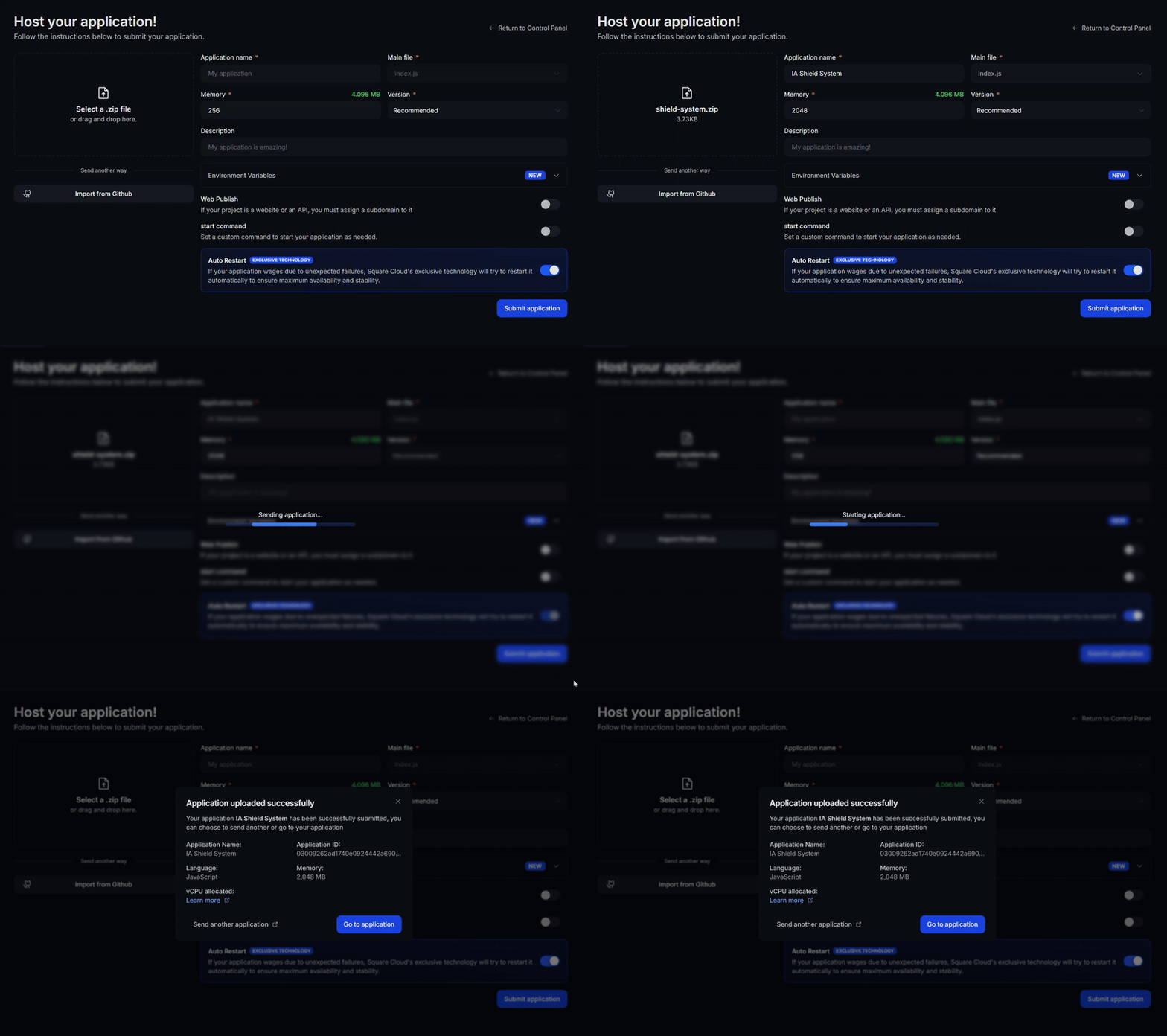
Tras el despliegue, puedes monitorear el estado y los logs de tu proyecto desde el panel.
4
Confirma que tu aplicación esté en vivo
Tu primer despliegue suele tardar menos de un minuto. En el dashboard, espera a que el estado de tu aplicación muestre “running” y revisa los logs por si hay errores de inicio.
Si desplegaste un sitio web o una API, abre
Si desplegaste un sitio web o una API, abre
https://<tu-subdominio>.squareweb.app en tu navegador: deberías ver tu aplicación respondiendo. Si desplegaste un bot, envíale un comando para confirmar que esté online.
A través de la CLI
Para usar este método, tu proyecto necesita un archivo de configuración llamadosquarecloud.app en su raíz. Le indica a Square Cloud cómo ejecutar tu aplicación.
Guía del archivo de configuración
Aprende a crear el archivo de configuración
squarecloud.app que define el entorno de tu aplicación.1
Instala la CLI
Instala la CLI de Square Cloud. Si ya la tienes, ejecuta el mismo comando para actualizarla:
2
Inicia sesión
Ejecuta el comando de abajo. Abre tu navegador: aprueba el inicio de sesión allí y la CLI queda lista. No hay ninguna clave de API que copiar. Para scripts y CI, consulta autenticación de la CLI.
3
Sube tu proyecto
Desde la carpeta de tu proyecto, ejecuta el comando de abajo. La CLI comprime la carpeta actual en un zip, dejando fuera lo que lista Para subir un zip que creaste tú mismo, pásalo con
squarecloud.ignore, y lo sube:--file:4
Confirma que tu aplicación esté en vivo
Tu primer despliegue suele tardar menos de un minuto. Revisa el estado y los logs de tu aplicación directamente desde la terminal:Si desplegaste un sitio web o una API, abre
https://<tu-subdominio>.squareweb.app en tu navegador: deberías ver tu aplicación respondiendo. Si desplegaste un bot, envíale un comando para confirmar que esté online.
https://hello-square-yourname.squareweb.app (con tu subdominio) responde Hello from Square Cloud!.
Próximos pasos
Archivo de configuración
Cada campo de
squarecloud.app: memoria, comando de inicio, subdominio y reinicios automáticos.Variables de entorno
Guarda tokens y cadenas de conexión fuera de tu código.
Solución de problemas
Corrige errores de subida, sitios que no cargan y apps que no inician.
Extensión de VS Code
Sube, haz commit y sigue los logs sin salir de tu editor.