

开始之前
Square Cloud 是一个付费平台,部署需要有效的套餐,这样你的项目从第一天起就运行在生产级基础设施上。创建你的账户,然后选择适合你的方案(可查看各套餐包含的内容)。注册
如果你以前从未使用过 Square,请注册以开始使用。
登录
如果你已经拥有账户,请登录以开始使用。
创建项目
新建一个文件夹,并在其中创建以下三个文件。1
编写应用
index.js 会用一条简短消息响应每个请求。它从 PORT 和 HOST 环境变量中读取端口和主机,Square Cloud 会把它们设置为 80 和 0.0.0.0:index.js
2
列出依赖
每个 Node.js 项目都需要一个
package.json:Square Cloud 会在启动应用之前安装其中列出的包。本示例没有依赖,但该文件必须存在,且不能为空。package.json
3
添加配置文件
squarecloud.app 告诉 Square Cloud 要运行哪个文件、预留多少内存以及使用哪个运行时版本。SUBDOMAIN 会把应用作为网站发布在 https://<subdomain>.squareweb.app,所以请选一个还没有被占用的名称。squarecloud.app
打包项目
使用 CLI 部署?可以跳过本节:squarecloud upload 会自动为你打包文件夹。
1
选择文件,而不是文件夹
打开项目文件夹,选中其中的所有内容。
squarecloud.app 必须位于 zip 的顶层:如果你压缩的是文件夹本身,文件会落在一个子文件夹中,部署会以 MISSING_CONFIG 失败。2
创建 zip
- Windows
- macOS
- Linux
右键单击选中的文件,选择 压缩为 ZIP 文件(Windows 11),或 发送到 → 压缩(zipped)文件夹。
3
检查大小
zip 最大可达 100 MB。不要包含
node_modules、虚拟环境和构建缓存:依赖会在服务器上安装,而且这些文件夹在部署时本来就会被删除。部署
在控制面板中上传 zip,或者用 CLI 一条命令完成部署。通过控制面板
1
访问上传页面
访问上传页面并上传你的项目 zip 文件。
2
配置你的环境
上传 zip 后,你需要为项目配置名称、主文件或运行时环境以及其他设置。
如果你上传的是 Web 项目,请务必选择 “Web Publication” 并为项目设置子域名。
如果你上传的是 Web 项目,请务必选择 “Web Publication” 并为项目设置子域名。
3
部署你的项目
最后,点击 “Deploy” 按钮,即可将项目托管到 Square Cloud。
部署完成后,你可以在控制面板中监控项目的状态和日志。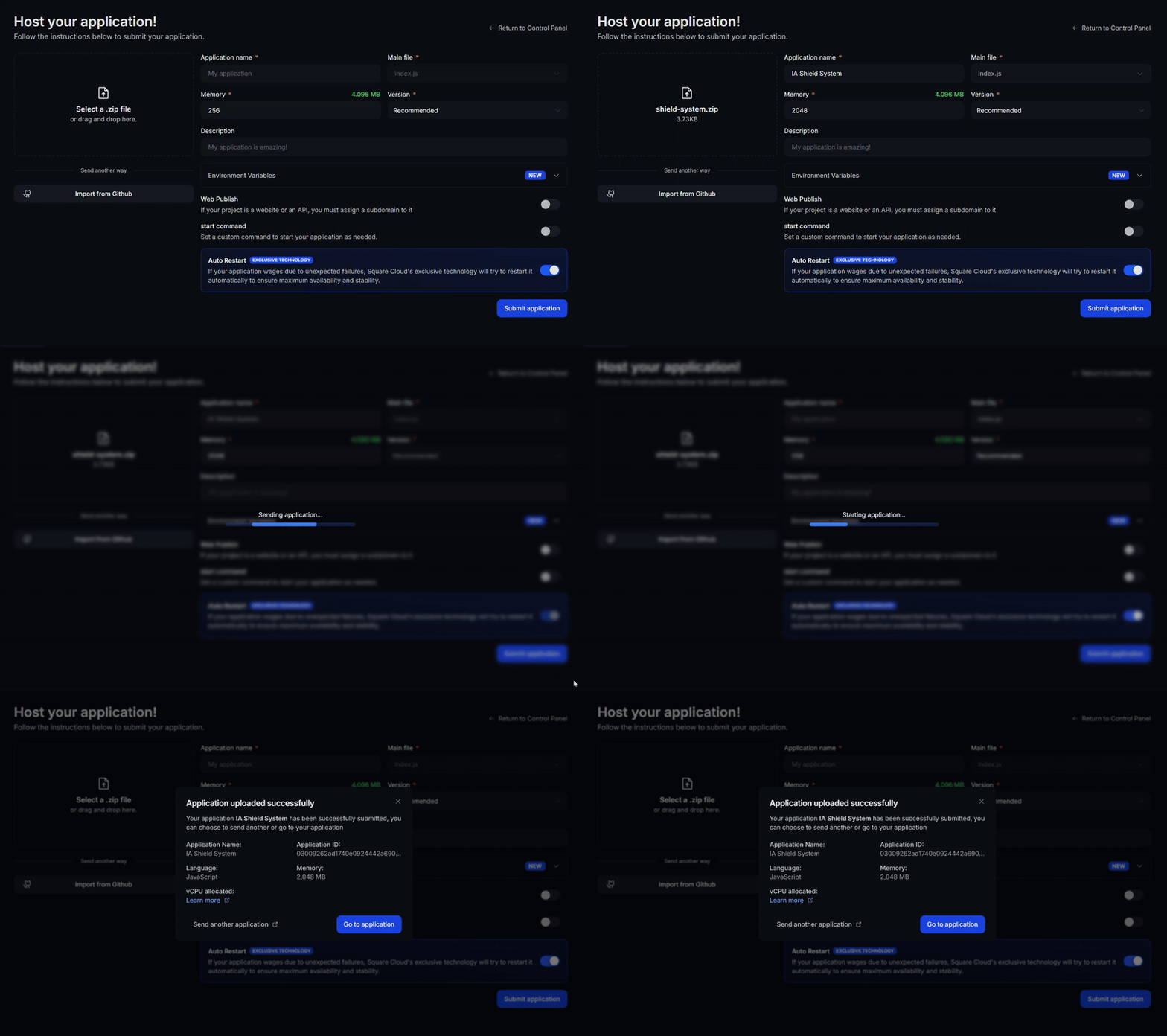
部署完成后,你可以在控制面板中监控项目的状态和日志。
4
确认你的应用已上线
首次部署通常在一分钟内完成。在控制面板中,等待你的应用状态显示为运行中,并检查日志中是否有启动错误。
如果你部署的是网站或 API,请在浏览器中打开
如果你部署的是网站或 API,请在浏览器中打开
https://<your-subdomain>.squareweb.app,你应该能看到应用正常响应。如果你部署的是机器人,发送一条命令确认它已上线。
通过 CLI
要使用此方法,你的项目根目录中需要有一个名为squarecloud.app 的配置文件。它告诉 Square Cloud 如何运行你的应用。
配置文件指南
了解如何创建定义你应用环境的
squarecloud.app 配置文件。1
安装 CLI
安装 Square Cloud CLI。如果你已经安装,运行同一条命令即可更新:
2
登录
运行下面的命令。它会打开你的浏览器:在浏览器中批准登录后,CLI 即可使用。无需复制任何 API 密钥。如需在脚本和 CI 中使用,请参阅 CLI 身份验证。
3
上传你的项目
4
确认你的应用已上线
首次部署通常在一分钟内完成。直接在终端中检查你的应用状态和日志:如果你部署的是网站或 API,请在浏览器中打开
https://<your-subdomain>.squareweb.app,你应该能看到应用正常响应。如果你部署的是机器人,发送一条命令确认它已上线。
https://hello-square-yourname.squareweb.app(换成你的子域名)会返回 Hello from Square Cloud!。
后续步骤
配置文件
squarecloud.app 的每个字段:内存、启动命令、子域名和自动重启。环境变量
把令牌和连接字符串存放在代码之外。
故障排除
解决上传错误、无法加载的网站和无法启动的应用。
VS Code 扩展
无需离开编辑器即可上传、commit 和查看日志。