> ## Documentation Index
> Fetch the complete documentation index at: https://docs.squarecloud.app/llms.txt
> Use this file to discover all available pages before exploring further.
# Serverless Storage - Square Cloud Blob Storage
> Scalable serverless storage with global CDN, zero transfer fees, and 99.999999999% availability. Square Cloud Blob Storage is ideal for applications requiring reliable storage.
 ## Why choose Square Cloud Blob Storage?
As the **largest bot hosting platform in Latin America**, trusted by **80 of the 100 largest Brazilian Discord servers**, we built Blob Storage to overcome the **limitations imposed by Discord’s CDN**. Our enterprise-grade solution ensures **stability and availability** for thousands of developers who need reliable asset storage.
In short, **Blob Storage** is a **serverless storage service** by Square Cloud that is **fast and scalable**, with **generous quotas** included in every plan and a **flexible pay-as-you-go model** for overages.
Blob Storage is currently in beta. If you have any feedback, please [contact us](https://squarecloud.app/en/support).
## Key Features
**Zero ingress/egress fees** – free data transfer.
**Automatic resource orchestration** with **dynamic provisioning**.
**Optimized distribution** via Cloudflare’s global network with **edge caching**.
**Up to 1PB of storage** and **1 billion free requests/day** available.
## Quotas and Pricing
Blob Storage offers clear, transparent pricing so you can choose the plan that fits your needs.
### Included Quotas
Each paid plan includes a **free storage quota** at no extra cost:
| Plan | Free Storage Included |
| ---------- | --------------------- |
| Hobby-1 | **5 GB** |
| Hobby-2 | **15 GB** |
| Standard-4 | **30 GB** |
| Standard-6 | **50 GB** |
| Standard-8 | **100 GB** |
| Pro-12 | **200 GB** |
| Pro-16 | **250 GB** |
| Enterprise | **250 GB** |
### Pay-as-you-go Overage
If your usage exceeds the included quota, you automatically switch to **pay-as-you-go**, paying **only for the extra space** you use.
**R\$ 0.25 per additional GB** beyond your free quota.
The Blob Storage service and pay-as-you-go feature are **only available** to subscribers of **paid plans**.
## Supported File Extensions
Our platform enforces a **strict MIME type whitelist** to ensure service **security and integrity**. This extension restriction is a **critical security measure** that prevents malicious file uploads and maintains compliance with **corporate security policies**.
| Category | Supported Extensions |
| --------------- | --------------------------------------------------------------------------------------------------- |
| **Video** | `.mp4`, `.mpeg`, `.webm`, `.flv`, `.m4v` |
| **Image** | `.jpg`, `.png`, `.apng`, `.tiff`, `.gif`, `.webp`, `.bmp`, `.svg`, `.ico`, `.cur`, `.heic`, `.heif` |
| **Audio** | `.wav`, `.ogg`, `.opus`, `.m4a`, `.mp3`, `.aac` |
| **Text** | `.html`, `.css`, `.csv`, `.txt`, `.sql` |
| **Application** | `.xml`, `.sql`, `.sqlite3`, `.p12`, `.pdf`, `.json`, `.js` |
**MIME Type Validation**: All files undergo **binary signature verification** to prevent **extension spoofing** and **malicious uploads**.
To request support for additional file types or discuss specific use cases, [contact our technical team](https://squarecloud.app/en/support).
## Performance & Benchmarks
Our infrastructure has undergone **extensive benchmarks** to ensure Square Cloud provides a **robust, reliable serverless storage solution**. Here are some key findings:
* **Latency**: Average file receive latency of **\~11ms**.
* **Throughput**: Average transfer rates of **\~12.5–18.75 MB/s (100–150 Mbps)** on typical connections, reaching **up to \~500 Mbps** on >1–2 Gbps networks.
* **Availability**: Average availability of **99.999999999% (11 nines)** (S3-based design).
In our internal tests in New York, latency remains **negligibly low**, well **below average**.
## Why choose Square Cloud Blob Storage?
As the **largest bot hosting platform in Latin America**, trusted by **80 of the 100 largest Brazilian Discord servers**, we built Blob Storage to overcome the **limitations imposed by Discord’s CDN**. Our enterprise-grade solution ensures **stability and availability** for thousands of developers who need reliable asset storage.
In short, **Blob Storage** is a **serverless storage service** by Square Cloud that is **fast and scalable**, with **generous quotas** included in every plan and a **flexible pay-as-you-go model** for overages.
Blob Storage is currently in beta. If you have any feedback, please [contact us](https://squarecloud.app/en/support).
## Key Features
**Zero ingress/egress fees** – free data transfer.
**Automatic resource orchestration** with **dynamic provisioning**.
**Optimized distribution** via Cloudflare’s global network with **edge caching**.
**Up to 1PB of storage** and **1 billion free requests/day** available.
## Quotas and Pricing
Blob Storage offers clear, transparent pricing so you can choose the plan that fits your needs.
### Included Quotas
Each paid plan includes a **free storage quota** at no extra cost:
| Plan | Free Storage Included |
| ---------- | --------------------- |
| Hobby-1 | **5 GB** |
| Hobby-2 | **15 GB** |
| Standard-4 | **30 GB** |
| Standard-6 | **50 GB** |
| Standard-8 | **100 GB** |
| Pro-12 | **200 GB** |
| Pro-16 | **250 GB** |
| Enterprise | **250 GB** |
### Pay-as-you-go Overage
If your usage exceeds the included quota, you automatically switch to **pay-as-you-go**, paying **only for the extra space** you use.
**R\$ 0.25 per additional GB** beyond your free quota.
The Blob Storage service and pay-as-you-go feature are **only available** to subscribers of **paid plans**.
## Supported File Extensions
Our platform enforces a **strict MIME type whitelist** to ensure service **security and integrity**. This extension restriction is a **critical security measure** that prevents malicious file uploads and maintains compliance with **corporate security policies**.
| Category | Supported Extensions |
| --------------- | --------------------------------------------------------------------------------------------------- |
| **Video** | `.mp4`, `.mpeg`, `.webm`, `.flv`, `.m4v` |
| **Image** | `.jpg`, `.png`, `.apng`, `.tiff`, `.gif`, `.webp`, `.bmp`, `.svg`, `.ico`, `.cur`, `.heic`, `.heif` |
| **Audio** | `.wav`, `.ogg`, `.opus`, `.m4a`, `.mp3`, `.aac` |
| **Text** | `.html`, `.css`, `.csv`, `.txt`, `.sql` |
| **Application** | `.xml`, `.sql`, `.sqlite3`, `.p12`, `.pdf`, `.json`, `.js` |
**MIME Type Validation**: All files undergo **binary signature verification** to prevent **extension spoofing** and **malicious uploads**.
To request support for additional file types or discuss specific use cases, [contact our technical team](https://squarecloud.app/en/support).
## Performance & Benchmarks
Our infrastructure has undergone **extensive benchmarks** to ensure Square Cloud provides a **robust, reliable serverless storage solution**. Here are some key findings:
* **Latency**: Average file receive latency of **\~11ms**.
* **Throughput**: Average transfer rates of **\~12.5–18.75 MB/s (100–150 Mbps)** on typical connections, reaching **up to \~500 Mbps** on >1–2 Gbps networks.
* **Availability**: Average availability of **99.999999999% (11 nines)** (S3-based design).
In our internal tests in New York, latency remains **negligibly low**, well **below average**.
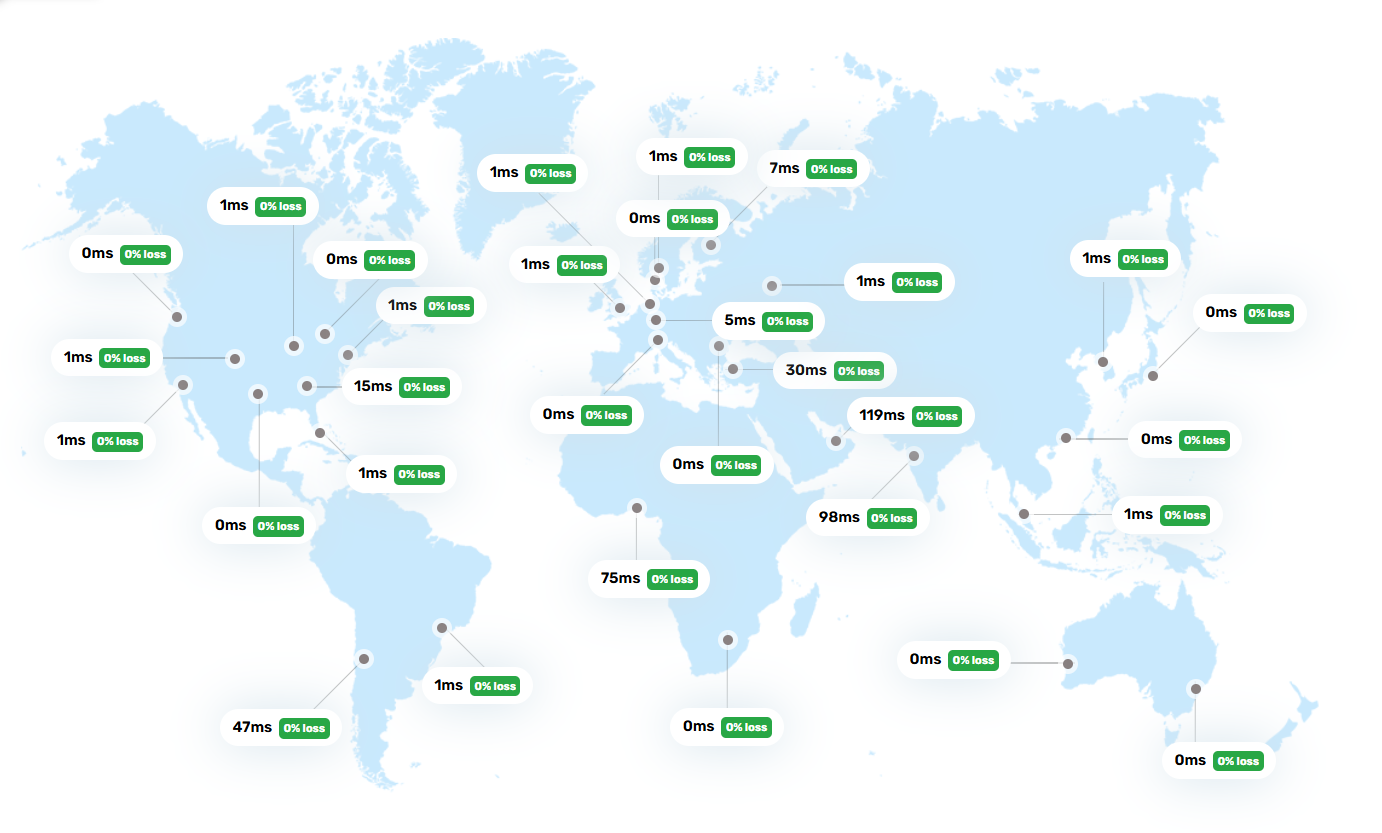 **Note**: Benchmark results are based on controlled tests and may vary significantly with **geographic location**, **file sizes**, **network quality**, and **peak usage**. For best performance, run tests in your production environment.
**Regional Limitations**: Users in **Africa** and some **Asian regions** may experience higher latencies due to **physical distance from data centers** and **local network infrastructure**.
## How to host your files
Upload your files to the [POST endpoint](/en/blob-reference/endpoint/post).
Access your files using the URL provided in the upload response.
The process is **simplified**: use your account API key for authentication and upload via a **single HTTPS request**. **No additional configuration** or complex infrastructure needed. Square Cloud **handles everything** for you.
**Note**: Benchmark results are based on controlled tests and may vary significantly with **geographic location**, **file sizes**, **network quality**, and **peak usage**. For best performance, run tests in your production environment.
**Regional Limitations**: Users in **Africa** and some **Asian regions** may experience higher latencies due to **physical distance from data centers** and **local network infrastructure**.
## How to host your files
Upload your files to the [POST endpoint](/en/blob-reference/endpoint/post).
Access your files using the URL provided in the upload response.
The process is **simplified**: use your account API key for authentication and upload via a **single HTTPS request**. **No additional configuration** or complex infrastructure needed. Square Cloud **handles everything** for you.